Baton proxy relay
Pass the connection.
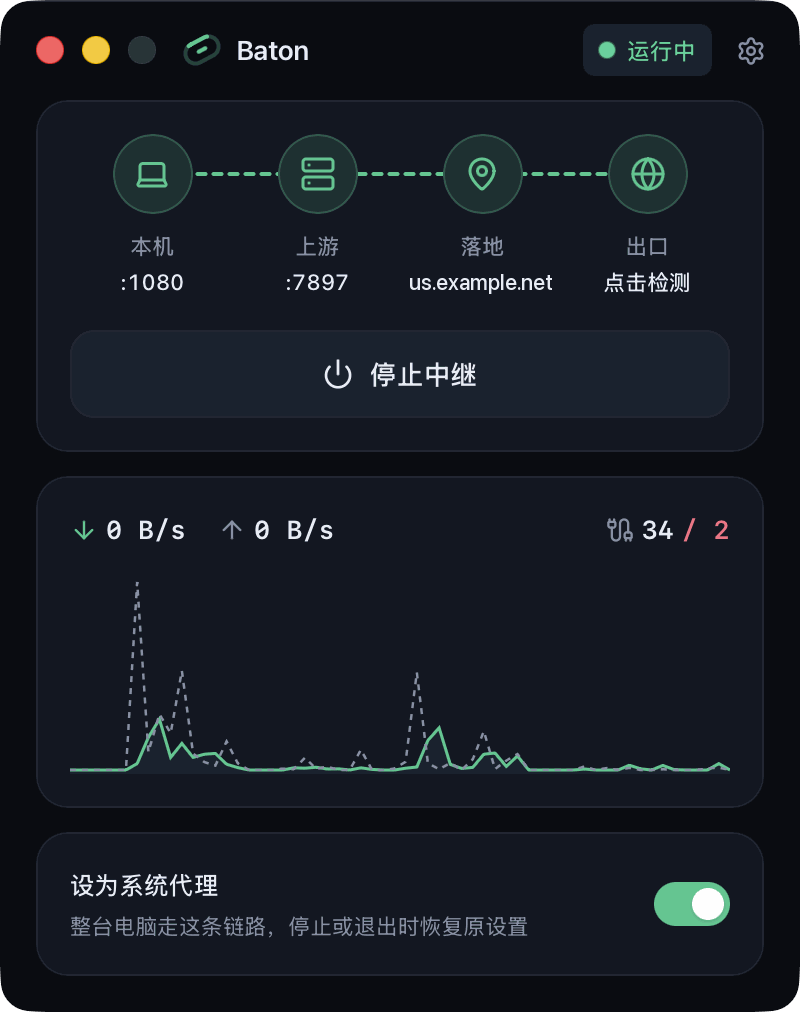
Add a dedicated residential IP after the proxy you already use. Baton chains your local proxy with a landing proxy and exposes one local HTTP and SOCKS5 port, so browsers, desktop apps, and the terminal reach social platforms and AI services through a stable residential exit.
Why a landing proxy
A better exit for everyday access
Many proxies exit through shared datacenter IPs. Social platforms, AI services, and other sites check where connections originate, so shared exits often trigger extra verification, restricted features, or repeated sign-ins. Baton keeps your current proxy connection and changes only the final hop to a dedicated residential IP.
Dedicated exit
Residential network
Consistent sign-ins
How it works
Apps connect to Baton. Baton chains both hops.
Baton connects to the landing proxy through your upstream proxy, then forwards traffic to the destination. Websites see the landing proxy's IP while your upstream proxy handles the connection to it.
- Your appsBrowser, desktop apps, or terminal
 Baton127.0.0.1:1080
- Upstream proxyYour local proxy or system proxy
- Landing proxyDedicated residential or ISP IP
- DestinationSocial platforms, AI services, and more
The local port accepts both HTTP and SOCKS5. Each hop uses HTTP CONNECT or SOCKS5 with its own credentials.
Features
Connect, start, and verify in one window
Set up both hops, check your exit IP, and monitor live traffic from a single compact window.
One port, two protocols
Configure each hop
System proxy in one click
Exit check and live traffic
Terminal and LAN sharing
Runs in the background
Get started
Three steps to a residential exit
Before you start, have your landing proxy's host, port, protocol, and credentials ready.
- 01
Choose an upstream proxy
Enter the host and port of your existing local proxy, or select System proxy.
- 02
Add the landing proxy
Enter the landing proxy's host, port, protocol, and credentials, then test the exit IP to confirm the chain works.
- 03
Start the relay and connect your apps
Click Start Relay, then point your apps to
127.0.0.1:1080or turn on Use as system proxy. If you changed the listen port, use that port instead.
From Chrovia
Separate exits for separate accounts
Baton routes your computer through one proxy chain. If you manage multiple accounts, Chrovia's browsers assign a separate proxy to each profile and isolate browser fingerprints, cookies, and local data.
PersonaHub
Fingerprint browser for multiple accounts
Merca
Multi-store browser for e-commerce sellers
Proxy providers
Find residential and ISP landing IPs
FAQ
Before you get started
Common questions about landing proxies, system proxy settings, and troubleshooting.
Does Baton provide landing IPs?
No. Baton is a local proxy relay; you bring both the upstream proxy and the landing proxy. If you need a landing IP, see Chrovia's list of proxy providers.
What kind of landing proxy should I use?
A dedicated static residential or ISP proxy works best, ideally in the region of the services you use. Shared or rotating proxies rarely keep sessions stable.
How do I confirm traffic leaves through the landing IP?
Click Egress in Baton's main window to test the full chain's exit IP, location, and latency. When editing the upstream hop, you can also test the upstream exit on its own for comparison.
Will every app use Baton when system proxy is on?
Apps that respect operating system proxy settings will use Baton automatically. Apps with independent proxy settings (or terminal sessions) should point to Baton's local address directly. You can also leave system proxy off and configure only specific apps.
Can I inspect the source or build it myself?
Yes. Baton is MIT licensed, and the source and build instructions are in the GitHub repository.
What should I check if the connection fails?
Baton indicates which hop failed. First confirm that your upstream proxy is running, then check the landing proxy's host, port, protocol, and credentials, as well as the local port in your app. If the issue persists, report it on GitHub Issues with your OS version, Baton version, and reproduction steps—without proxy passwords or other sensitive data.
Download Baton and add your residential exit
Free and open source for Windows and macOS.
Latest version v0.3.3 · Installers hosted on GitHub
Previous versions and release notes